Claim Earth: Simulating, Rendering, and Colliding with a Texture
How Claim Earth stores its hex world in a texture, simulates sand, water, lava and gas with GPU render passes, draws the cave with a single shader, and lets the player collide with it.
In Claim Earth, opening a passage can do much more than make room for the player. Sand falls into the gap. Water finds a new route, reaches lava, and becomes steam. The steam collects under a ceiling while the lava starts forming a stone crust. Nearby sulfur can turn a flooded pocket into acid or begin releasing poisonous gas.
These interactions all operate on a hexagonal world stored as a texture. GPU render passes advance the terrain, a presentation shader draws the cave, and custom collision code lets the player stand on the resulting cells. There is no terrain mesh to rebuild when a bomb changes the map, and no terrain collider mesh to regenerate.
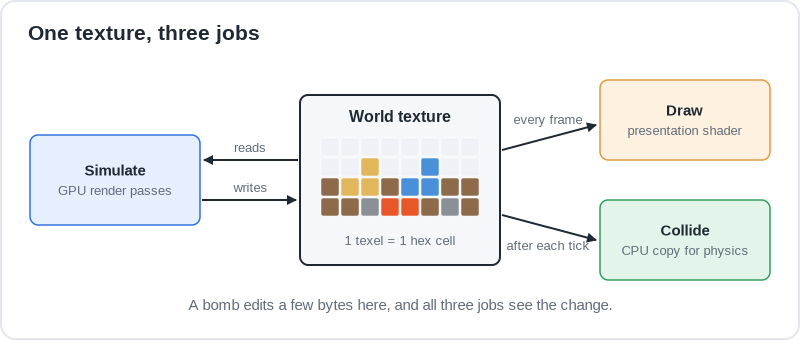
Here is how those pieces fit together in Godot’s Compatibility renderer, with a single-threaded Web export as the baseline.
Four bytes per hex
The default world is 100 columns wide and 512 rows deep: 51,200 hex cells. Its simulation texture has the same dimensions. One texel represents one cell, regardless of how many screen pixels that hex occupies.
The texture uses RGBA8, giving each cell four bytes. Those channels contain data rather than display colors.
R: Two material IDs, packed into four bits each.G: Primary material quantity.B: Lighting.A: Secondary material quantity.
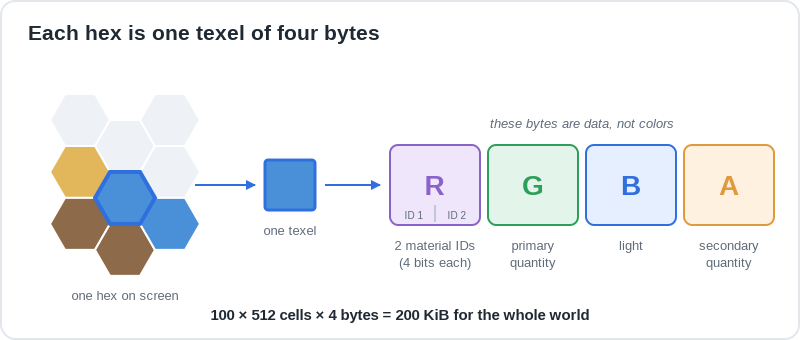
That makes one raw world snapshot 200 KiB. Intermediate render targets, material artwork, and other lookup textures are additional allocations.
The primary material is the cell’s visible material and the one gameplay queries use. The secondary material holds displaced content that still exists in the simulation. Each component has its own quantity.
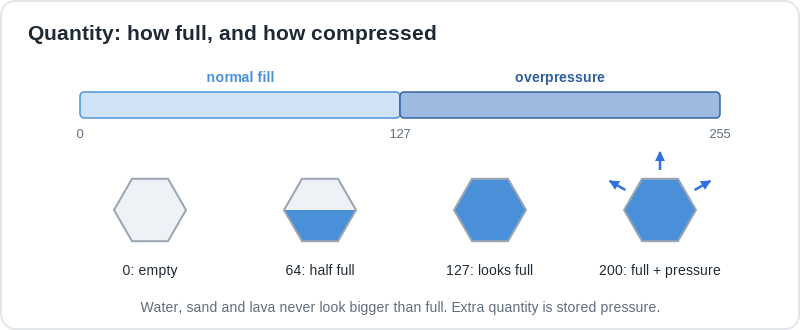
For sand, water, and lava, 127 quantity represents visible fullness. Higher values, up to 255, store overpressure without making the hex look larger. Gases have their own normal pressure values: air uses 64, for example. This gives the simulation room to compress material when it cannot immediately escape.
Simulating terrain with render passes
The terrain simulation is a cellular automaton: each update applies local rules to cells and their neighbors. Gravity, flow, displacement, and contact reactions combine to produce the larger movement visible in the cave.
The GPU runs those rules through a fragment shader. A pass samples the previous state texture and writes the next state into a render target. Godot SubViewports provide those targets, so the implementation uses ordinary raster rendering without requiring a compute shader.
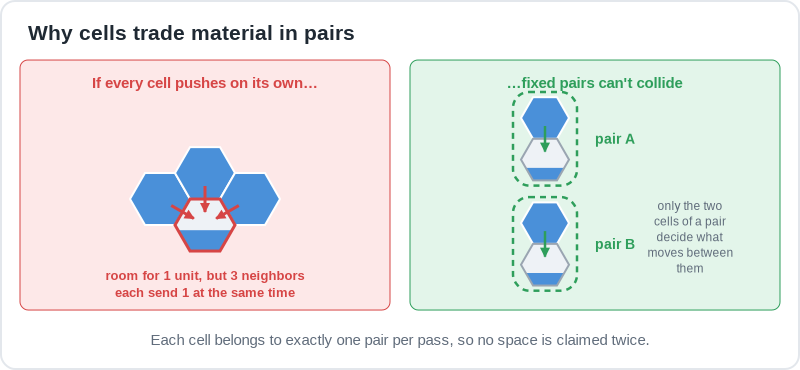
The difficult part is deciding who may transfer material where. If every cell independently pushes water into its neighbors, several cells can claim the same destination capacity. The simulation instead divides connections into independent pairs for each pass. Each fragment resolves its pair from the same two source cells and writes its own cell’s result.
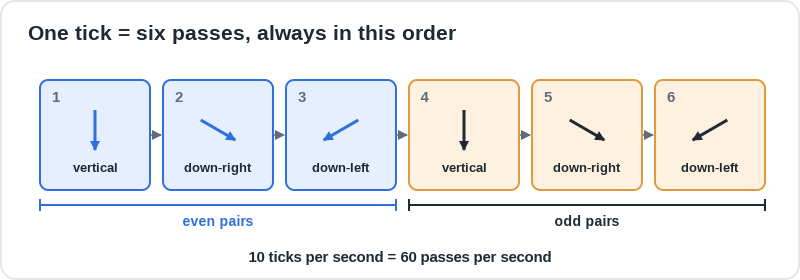
A complete tick contains six ordered passes:
- Vertical even pairs.
- Down-right even pairs.
- Down-left even pairs.
- Vertical odd pairs.
- Down-right odd pairs.
- Down-left odd pairs.
The even and odd pairings alternate which connections participate. Across the sequence, material can move through the hex grid without competing writes within a pass.
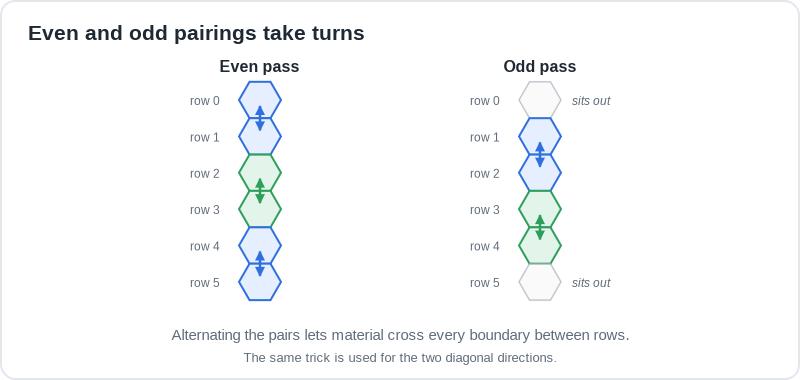
The backend has two banks of six render targets. Each scheduled pass reads the previous pass’s output, and alternating banks protect the textures still used for presentation.
The scheduler accrues 60 passes per active gameplay second, which corresponds to ten complete six-pass ticks per second. A fast presentation frame may have no simulation work due. A slower frame can submit several ordered passes together, up to the end of the current tick. Terrain speed therefore follows elapsed gameplay time rather than the number of frames drawn.
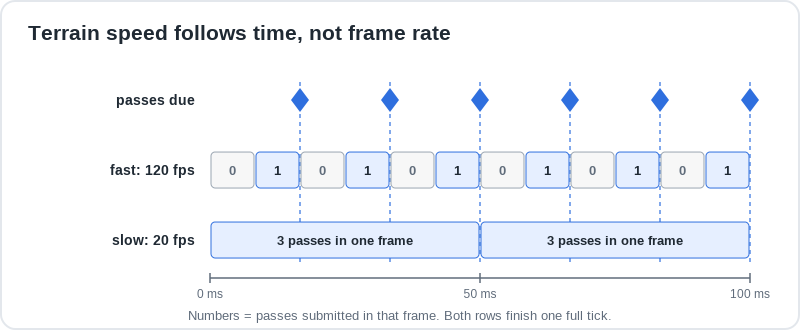
Before a run begins, the generated map also settles for 50 complete ticks. Water, sand, and gases can move into place before the player enters.
Keeping displaced material inside a cell
Consider sand falling into water. The sand needs to occupy the destination, but the water needs somewhere to go. Deleting it would make material disappear whenever something denser arrived.
The secondary component provides temporary storage. As sand displaces water, sand becomes the denser primary material and displaced water can remain in the cell as secondary content. It becomes invisible, but its quantity is still tracked.
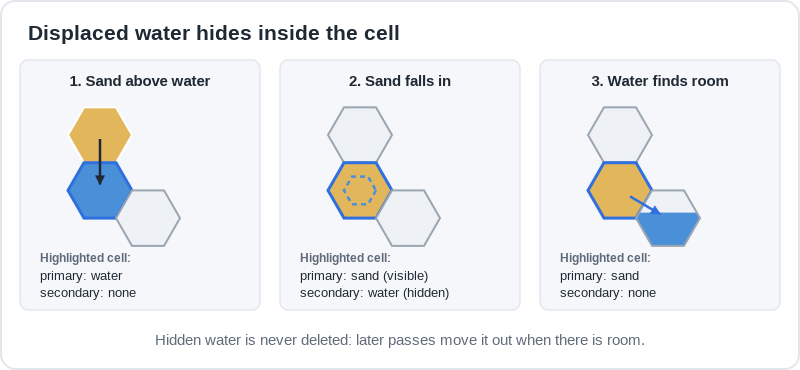
Later pair passes try to move that secondary water into compatible neighboring capacity. If it is trapped, pressure can redistribute into full cells of the same material, within the packed quantity limit.
After resolving a pair, the shader normalizes both cells: it removes empty components, merges matching materials, promotes a surviving secondary component when the primary empties, and orders different components by density. Hidden water can therefore become visible again when the sand moves away.
This hidden content is stored inside the cell’s four bytes. It is separate from the intermediate render textures used to calculate successive passes.
Only the primary component affects rendering, collision, hazards, viscosity, and item contact. A secondary component is simulation storage, so hidden lava does not apply a second invisible contact hazard alongside the visible material.
There are limits to this representation. A cell can hold two material types, and its quantities have a finite capacity. Rules must respect those limits. Boiling, for example, waits when the cell has no component capacity for the expanded steam.
Transport preserves component quantities. Reactions, explosions, and gas escaping through the open top of the map are explicit transformations, sources, or sinks.
How the materials interact
The materials share movement rules driven by their definitions. Density determines displacement priority, while transfer rates and pressure settings control how quickly and where content moves. Water flows readily; lava behaves as a slower, more viscous liquid. Light gases use an inverted form of the liquid rules to rise and spread beneath ceilings.
Contact reactions add the changes that make those flows interesting. These are authored gameplay rules rather than a chemical model.
Water, lava, and steam
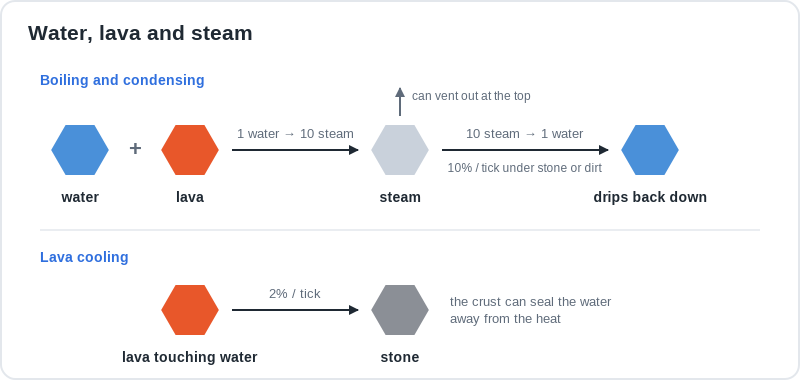
Once per tick, a water cell checks whether it touches lava. Contact converts water into steam at the configured rate, with one water quantity producing ten steam quantity in the default setup. Checking once per cell prevents water surrounded by several lava cells from boiling several times as quickly.
The expansion makes available storage important. Steam needs space inside the cell before it can spread outward.
Reacting lava has a 2% chance per tick to become a full stone hex. Sustained contact can build a crust that separates the remaining water from the heat source.
Steam rises through air and spreads beneath ceilings. Overpressure lets it push into other available space; downward movement requires its higher exits to be blocked. Steam reaching the top row can vent out of the world.
Under stone or dirt, steam has a 10% chance per tick to condense. A successful reaction consumes ten steam quantity and leaves one water quantity, which can drip back down. A smaller remaining amount of steam disappears without producing water.
These chance reactions use integer hashes of the run seed, tick, cell position, and a salt. The same simulation inputs produce the same reaction decisions.
Sulfur, acid, and poisonous gas
Sulfur adds two different routes through the system.
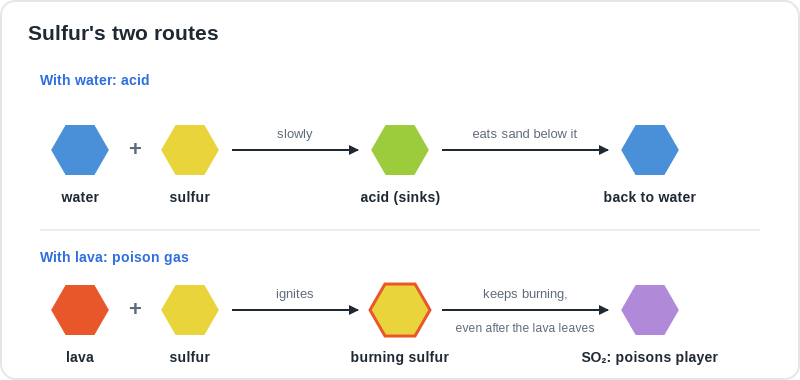
Water touching sulfur gradually consumes sulfur and converts water into sulfuric acid. The resulting dense liquid can sink beneath water. Acid also consumes sand below it and becomes water, so a reaction can alter both a hazard pocket and the ground containing it.
Lava ignites sulfur. Once ignited, the sulfur continues burning and producing sulfur dioxide after the initial contact ends.
The burning state uses the same secondary component mechanism: burning sulfur retains a small sulfur dioxide token as its ignition marker. Subsequent updates consume sulfur and produce more gas.
Sulfur dioxide behaves as a heavy gas. It settles through air, while overpressure can drive it upward. It also blocks breathing and builds the player’s poison meter. Steam remains breathable but contributes heat damage. Material identity therefore connects the simulation to distinct player hazards.
The interaction matters when terrain changes. Opening a wall can redirect water toward sulfur, release a trapped gas pocket, or let lava reach a mineral deposit. Those outcomes follow from the cells and their local rules.
Drawing the cave with one quad
The terrain presenter draws one quad covering the world. Its fragment shader converts each fragment’s world position into a hex coordinate and a position inside that hex.
From there it samples the world data and the material lookup textures. The shader determines the visible material, partial fill, boundary shape, outline, and lighting. Material artwork comes from an atlas, while additional shader effects animate liquid surfaces.
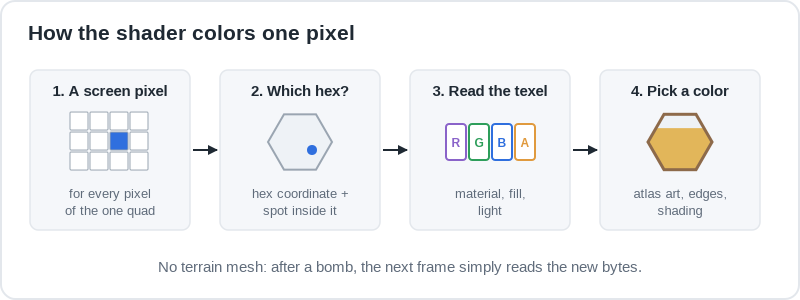
This separates simulation resolution from display resolution. A single simulation texel can become a large, textured hex on screen.
The presenter samples the completed GPU simulation texture directly. It also retains the completed even phase for a specific visual purpose: drawing verified vertical trails through cells that are air in the final state. Falling liquids retain their fluid appearance, and falling sand retains its solid material.
Lighting occupies the world texture’s B channel. Simulation passes propagate
light from terrain and external sources, while the presentation shader turns that
value into cave darkness and visible material brightness. Retained exploration
values also support fog of war.
Bombing a wall changes cell data. The next presentation uses those changed cells without generating new terrain polygons. The terrain itself remains one quad and one shader material; players, items, backgrounds, and effects have their own rendering.
Turning hex edges into cave walls
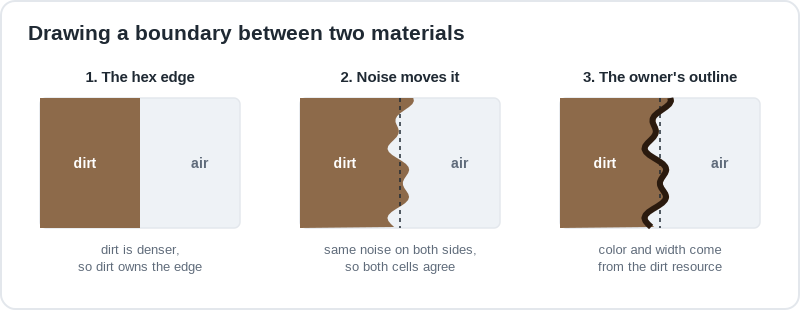
Drawn naively, the terrain would look like a board game: every cell a crisp hexagon. The presenter treats hex edges as material boundaries instead, and does that work only where the material actually changes.
Most fragments never reach that step. The shader measures how far the fragment is from the nearest edge of its hex. Outside a narrow band along the edges, the pixel takes its own cell’s material and skips boundary work entirely.
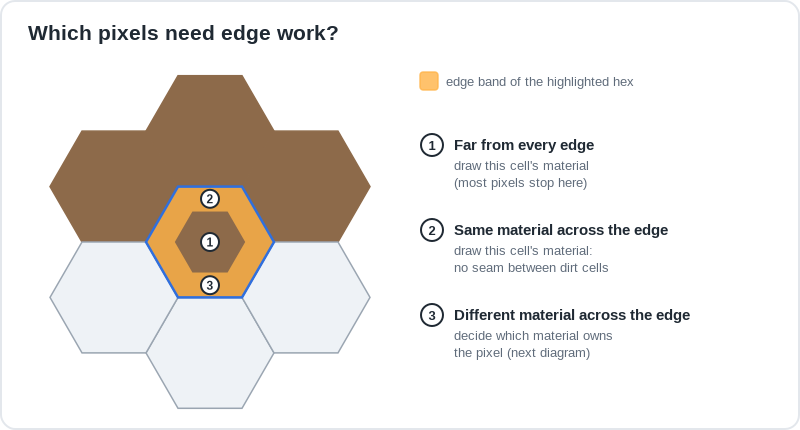
Inside the band, the shader samples the neighbor across that edge. If the neighbor holds the same material, there is still nothing to do. Two dirt cells merge into one continuous surface with no seam, so a wall made of hundreds of dirt hexes reads as one wall.
When the materials differ, one of them owns the boundary. The denser material wins: dirt owns its edge against air, and sand owns its edge against water. Equal densities fall back to a fixed ID order, so the decision never flips between frames.
The boundary is not drawn on the straight hex edge. A smooth value-noise function,
sampled at the fragment’s world position, pushes it a few pixels into one cell or
the other. Both cells evaluate the same noise at the same world position, so they
agree on exactly where the wavy line falls. The owning material then draws its
outline along that line, with a color and width taken from its
TerrainEdgeDefinition resource.
Noise alone would still leave the hexes’ sharp 120° corners visible. Near a vertex, the shader therefore looks at the two neighbors that share that corner. If the current cell is denser than both, the corner is exposed and gets rounded off: pixels outside a corner circle are handed to a neighbor. If both neighbors hold the same denser material, it is an inside corner, and that material fills it with the matching curve.
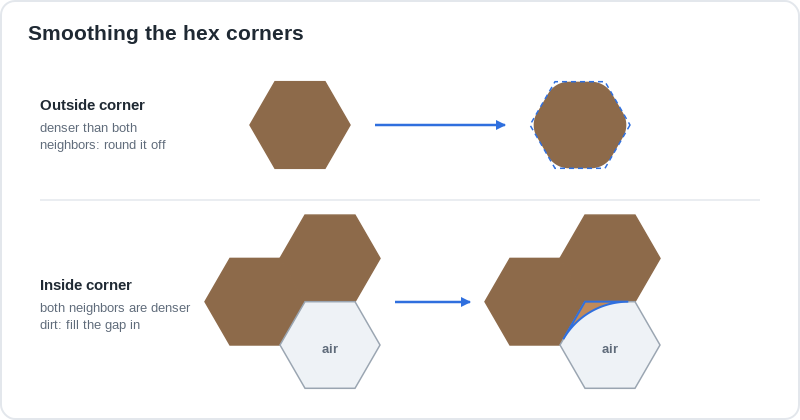
None of this is stored. Every boundary is decided per pixel from the world texture, so when a bomb removes a cell, the next frame finds new neighbors and draws a fresh, rounded edge around the crater.
Colliding with the committed world
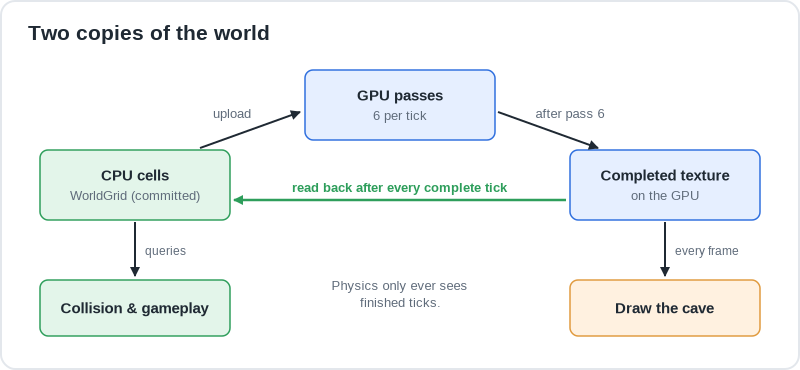
The player still needs solid ground, wall contacts, and reliable landings. Those checks operate on a CPU copy of the completed terrain state.
At the end of a six-pass tick, the backend reads the final render texture back into WorldGrid’s packed byte buffer. Gameplay collision reads this committed snapshot while rendering continues to use the GPU texture.
The data flow is: committed CPU cells -> GPU simulation passes -> completed GPU texture -> terrain presentation shader. After each complete tick, readback updates the CPU cells used by collision and gameplay queries.
TerrainCollisionQuery converts a body’s position into a small range of nearby candidate cells. It checks material solidity and quantity, then performs geometric tests against the corresponding hex polygons.
Those polygons are calculated for the query. They are not stored as a terrain physics mesh or registered as thousands of collider objects.
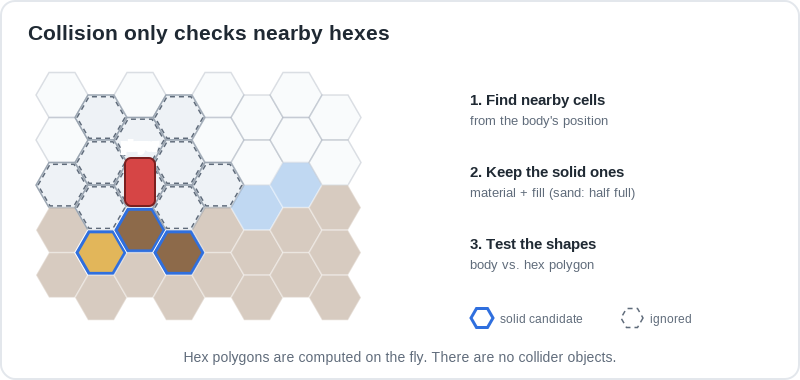
The movement solver uses the contacts to resolve motion, floor support, and stepping over low terrain. Related queries handle circular and convex polygon bodies, so terrain-aware objects can use the same committed world.
Quantity matters here too. Sand becomes solid at half fill, according to its configured rule. Liquids remain passable and apply drag through separate fill-aware sampling.
Player physics runs independently of the terrain commit cadence. It keeps resolving movement against the latest completed snapshot while another simulation tick is being calculated.
Making explosions and simulation agree
Explosions introduce another writer. They change the CPU world immediately, potentially while the GPU is partway through a tick.
Allowing that unfinished tick to commit would risk replacing the explosion’s changes with a result calculated from older terrain.
Gameplay mutations therefore publish an exact set of changed cells. The backend cancels unfinished simulation work, uploads the patched world state, and restarts from it. Stale render callbacks are invalidated so abandoned work cannot publish a later result.
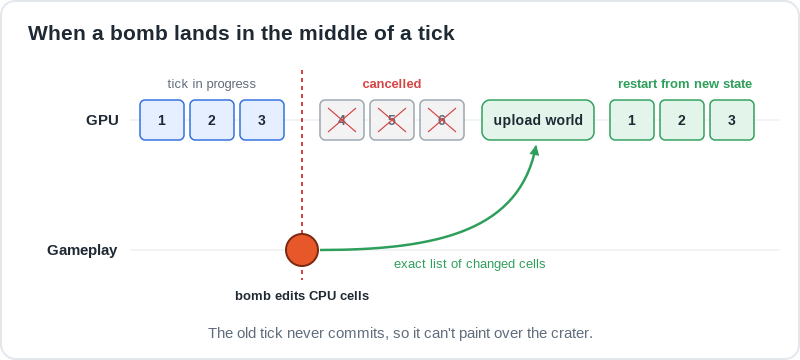
This gives gameplay mutations a clear priority while keeping partially simulated states out of collision queries. The player, item code, and terrain shader all consume completed states.
The costs of this architecture
The approach keeps scene complexity independent of cell count. A larger map adds texture data and simulation work without adding a Node or physics collider for every hex.
It still has costs. Each simulation pass processes the world texture. Reading the completed texture back to the CPU introduces synchronization and transfer work. The presentation shader spends GPU time on material sampling, boundaries, lighting, and fluid effects. One terrain draw call does not make that fragment work free.
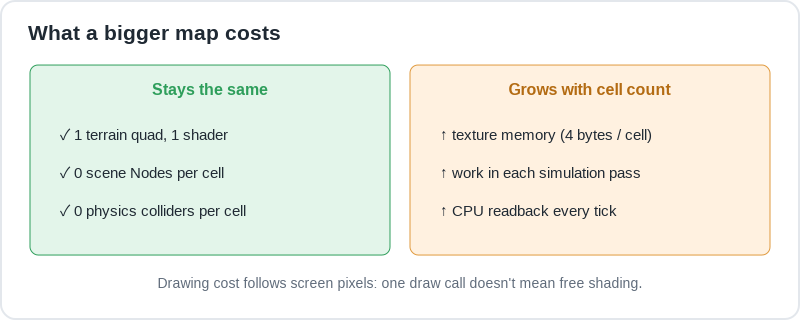
The cell format also shapes the rules: four-bit material IDs, two components per cell, and byte-sized quantities are deliberate limits. The hidden component helps conserve displaced content within that compact representation, but it cannot hold an arbitrary mixture.
For Claim Earth, the useful result is a common representation across systems. A bomb changes a few bytes, local rules carry the consequences through the cave, the shader draws the new terrain, and collision queries give it physical meaning.
That is what lets a small opening become a stream, a steam pocket, or a new route down.