

Digital Tree: Getting Blender Skeleton Data into a Unity Shader
A glowing wireframe tree built from a Blender skin skeleton, with Python operators that bake depth and radius per vertex and a custom mesh format to bring them into Unity.
Digital Tree is a small visual experiment: a stylized tree drawn as a neon wireframe, with a magenta trunk, a green low-poly canopy and light running through the branches, standing on a dark synthwave-style landscape. The clip is only four seconds long, but most of the work is not in it. It went into the pipeline that gets the right data from Blender to the shader.
The problem: a tree is a graph, not just a mesh
The tree’s structure is modeled in Blender with the Skin modifier. You draw a skeleton made only of vertices and edges, give each vertex a radius, and the modifier wraps a mesh around it. One vertex is marked as the skin root, which here is the base of the trunk. It is a fast way to block out branching shapes, and the skeleton itself is a clean description of the tree: a graph of points, each with a thickness.
For the effect I wanted, the skeleton is more useful than the skinned surface. To make light flow from the roots to the tips, or to scale an effect by branch thickness, the shader needs to know two things per vertex:
- how far it is from the root, counted along the branches;
- how thick the branch is at that point.
Neither of these survives a normal export. Blender knows the skin radius and the root flag, but they live in the modifier’s own data layer, and standard formats like FBX only carry the usual positions, normals, UVs and colors. So I wrote a few small tools to bridge the gap. They are in my BlenderTools repository.
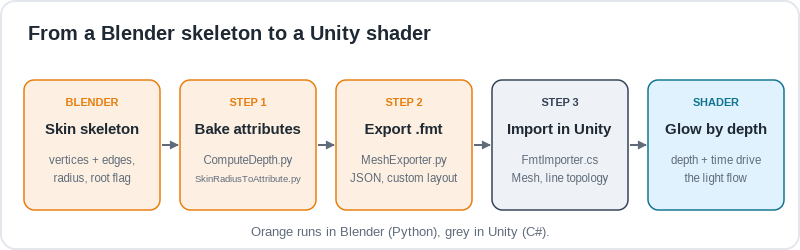
Step 1: bake the skeleton data into attributes
Blender’s generic mesh attributes are the right place to store custom per-vertex data, so the first two tools are operators that fill them in.
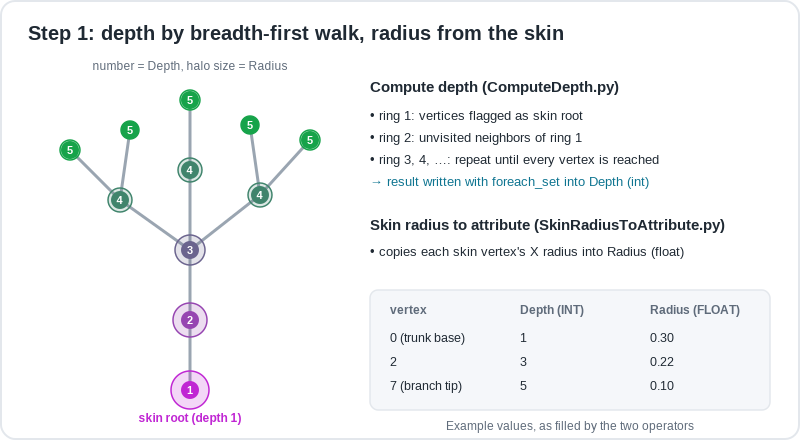
Skin radius to attribute (SkinRadiusToAttribute.py) is the simple one. It reads the X radius of every skin vertex and writes it into a float attribute called Radius.
Compute depth (ComputeDepth.py) is the interesting one. It runs a breadth-first traversal of the skeleton, starting from the vertices flagged as skin root:
- every root vertex gets depth 1;
- their neighbors along the edges that have not been visited yet get depth 2;
- and so on, one ring at a time, until every reachable vertex has a value.
The result goes into an integer Depth attribute. Since the skeleton of a tree has no cycles, this value is exactly the number of edges between a vertex and the base of the trunk, which is the “distance along the branches” the shader needs. Depth 0 is reserved for “not visited”, which is why the root starts at 1. The operator walks the mesh with bmesh to get the edge connectivity, and writes the whole array back in one call with foreach_set.
Both operators expect the attributes to already exist on the mesh: you create Depth (integer) and Radius (float) in the attribute panel, then run the operators from the Object menu.
Step 2: a flexible mesh format
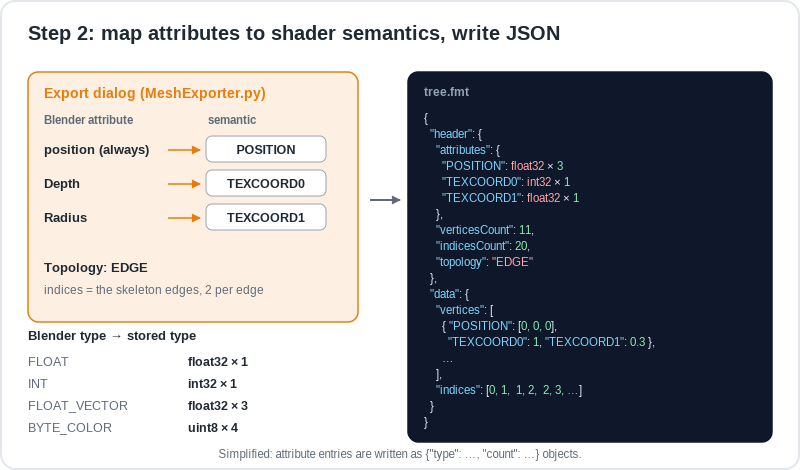
With the data in attributes, it still has to leave Blender. Instead of fighting an existing format, I wrote an exporter (MeshExporter.py) for a tiny custom one, the flexible mesh text format (.fmt). It is plain JSON with:
- a header that describes the vertex layout: for each attribute, its shader semantic, its type (
float32,int32,uint8) and its component count, plus the vertex count, index count and topology; - a data section with the vertices and the indices.
The key feature is the attribute mapping. When you open the export dialog, it lists every attribute on the mesh and proposes a shader semantic for each (TEXCOORD0, TEXCOORD1, and so on), which you can change. Position is always exported, and each Blender attribute type is translated into a type and a count: a float becomes one float32, a vector three, a byte color four uint8.
The exporter also lets you choose the topology. For this project I export edges, not triangles: the index buffer is just the list of skeleton edges, two vertex indices each. That gives the shader the branch graph itself, rendered as lines.
Step 3: a Unity scripted importer
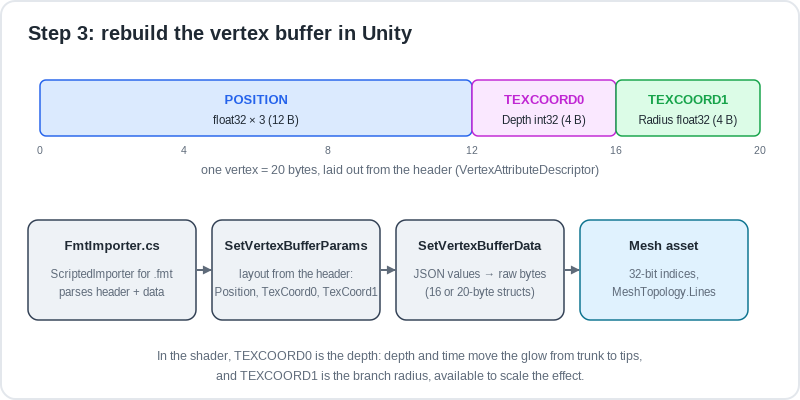
On the Unity side, a ScriptedImporter (FmtImporter.cs) registered for the .fmt extension turns the file into a Mesh asset when it is dropped into the project. It:
- builds a
VertexAttributeDescriptorlayout from the header, mappingPOSITION,TEXCOORD0andTEXCOORD1to Unity’s vertex attributes; - converts each vertex from JSON values into raw bytes in that layout and fills the vertex buffer with
SetVertexBufferData; - fills a 32-bit index buffer and creates a single submesh with
MeshTopology.Linesfor edge exports.
This uses Unity’s advanced mesh API, so the depth and radius arrive in the shader exactly as stored, an integer and a float in their own texture coordinate channels, without being squeezed into UVs or vertex colors. In the shader, depth gives each point its position along the tree, so anything driven by depth and time travels from the trunk toward the tips.
Limitations
This is a tool built for one project, and it shows:
- the exporter writes indices only for the edge topology; triangle export is in the options but not implemented yet;
- the importer only knows two texture coordinate channels, and only handles vertex sizes of 16 and 20 bytes, which is exactly position plus one or two scalar attributes (position, depth and radius is 20 bytes);
- JSON is a verbose container for vertex data, which is fine for a small skeleton but would not scale to large meshes.
None of that matters for this tree, and each point is easy to extend when another project needs it.
What I take from it
The useful lesson is about where data lives. Blender already had everything I needed (the branch graph, the root, the thickness), but it was locked inside a modifier. Moving it into generic attributes, then into a format that lets me choose exactly which vertex channel each attribute lands in, made the shader side simple. Writing a Blender operator or a Unity scripted importer is a small investment, and it is often cheaper than bending a standard format to carry data it was never designed for.
Links
- Source code (Blender add-ons and Unity importer): github.com/florian-noirbent/BlenderTools
- Step 1:
ComputeDepth.py,SkinRadiusToAttribute.py - Step 2:
MeshExporter.py - Step 3:
FmtImporter.cs
- Step 1:
- Video: Digital Tree on YouTube