

Voxel Engine, Part 1: An Infinite Terrain in Unity
The first prototype of my infinite voxel terrain in Unity, three ways to extract its surface, and why Minecraft's cubes are a game design choice more than a technical one.
This is the first time I’m writing about a project that is still in progress. Before getting into it, a quick update: in an earlier post I said I was remaking my first game. I have put that project on hold because I have nobody to test it with. I wrote in my introduction that I make games for myself, but on second thought that doesn’t really hold up, especially for a multiplayer game. The remake works, and I’ll show it as soon as I find someone to record a video with.
My plan for the coming weeks was a series of small experiments. I’d like to explore emergent behavior, for example by reinventing the Game of Life in my own way. In the meantime, though, I started what I said I wanted to build: an infinite terrain generator based on voxels.
I hesitated for a long time between C++ and Unity. C++ brings performance and freedom, and makes optimization easier. Unity mostly brings constraints, but a voxel framework built on Unity can be shared and reused in many interesting ways, so that’s what I chose.
To make the framework easy to drop into another project, my first goal was to integrate it as tightly as possible with Unity: lights, rigidbodies and the rest of the engine should work on the terrain transparently. That is the case today, but I will probably have to give up some of this in future versions, which removes much of Unity’s appeal. Right now, advanced lighting computations are out of reach, and using a mesh collider to compute physics from triangles, when everything the physics needs could be read directly from the voxels, is very inefficient: generating the mesh colliders currently takes about 90% of the computation time.

The original Unity Web Player demo is no longer available.
A glitch may load Escape instead; while I fix it, you can open the demo on its own page (link no longer available).
Controls: ZQSD/WASD to move, the mouse to rotate the camera, left click to add voxels and right click to remove them (hold the button in marching cubes mode).
Three buttons switch between isosurface extraction methods, that is, the different ways of turning the voxel grid into a visible surface:
- Cubes: Minecraft-style blocks.
- Marching cubes: a smooth surface.
- Hybrid marching cubes: plain marching cubes fed with saturated values, which brings back some sharp angles (see Game design below for why).
The terrain is infinite in all six directions.
Game design
Before starting this experiment, I naively assumed that Minecraft and all its clones used cubes because they were easier. Other extraction methods are indeed a bit more complex to implement, but whichever one you choose, the implementation time stays tiny compared to the time a full game takes. I think they all use cubes for the “Lego” feel: cubes make building easy. I tried to build a house in the marching cubes version, and it was definitely not fun. That’s why I tried the saturated marching cubes version, to get the building side back, but I doubt it can ever match how quick and fun it is to build a dirt house in Minecraft. Then again, a voxel engine doesn’t have to be about making a Minecraft clone, and a game doesn’t have to be about building at all. A Worms-like game, for example, would be a good fit.
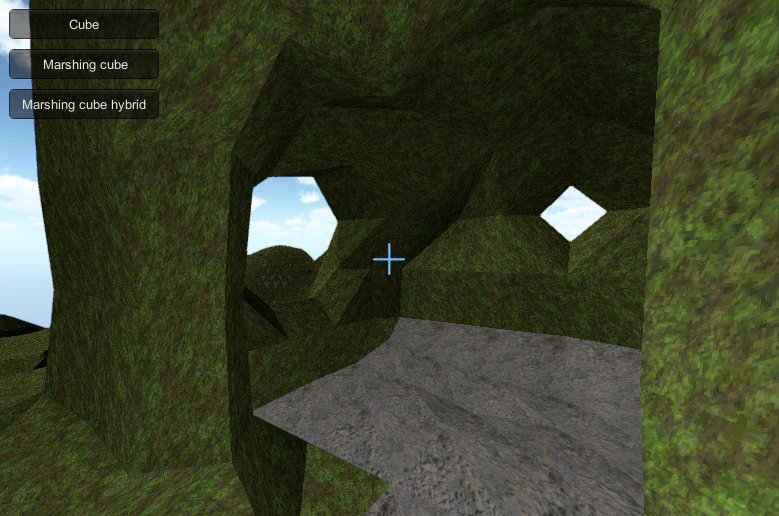
Looks like Yoda’s house on Dagobah.
What next?
First, I’ll try other isosurface extraction algorithms. The first is dual contouring, which seems to give promising results. I also came across adaptive skeleton climbing, which looks like a very efficient way to generate several levels of detail (LOD). I’d also like to try a homemade approach built on a set of predefined shapes: the map would look like the saturated marching cubes version, but players could edit it block by block. I found a project that takes a similar approach, Blockscape, which strikes a nice balance between visual quality and ease of editing. There is also the option of combining several methods, as StarForge does, with marching cubes for the natural terrain and cubes for player constructions.
Once I’ve settled on the method for the framework, I’ll implement it with compute shaders (that article will also be a chance to talk about my experiments with CUDA and OpenCL), and I’ll remove the other methods. It may seem a shame for a framework not to keep every option open, but too many systems will depend on the surface representation (shaders, physics, dynamic light mapping, maybe fluids…) to support a whole range of methods.
On a different front, I’d like to study terrain generation: try different types of noise and combine them to get a realistic terrain that is still cheap enough to generate in real time on the GPU. That is almost a project of its own, and the small glimpse I’ve had of it showed me how deep the subject is.
The most urgent task, though, is to rework the chunk data structure. The seams you can see when editing the terrain in marching cubes mode exist because a chunk can’t quickly access its neighbors, and marching cubes needs the neighboring voxels to build a continuous surface across chunk borders.
The source code of a later version of this engine is archived on GitHub, along with the original Web Player build.