

Voxel Engine, Part 2: Chunks, Transparency and Colliders
A multithreaded chunk pipeline, the infinite-height lighting problem, transparent voxels, and a mesh collider that merges faces into large rectangles.
It’s been almost a month since my last post about the voxel engine, so it’s time for an update.
I’ve put compute shaders aside for now: I rarely get to work on DirectX 11 hardware, which makes it hard to make real progress. In any case, the engine still needs CPU fallbacks for older hardware.
Chunk management
Most of the work went into chunk management. Chunks now form a network in which each chunk holds references to its six neighbors, and each chunk goes through five states:
-
Initialised: theChunkManageradds chunks to the network based on the player’s position, and this state is set once a chunk is initialized. The init function looks up the six adjacent chunks (this lookup leaves a lot of room for optimization) and creates a two-way link with each one it finds. During this process, any neighbor that now has all six of its links is added to the queue of chunks waiting for voxel generation. -
VoxelGenerated: every frame, theChunkManagerstarts voxel generation for the waiting chunks, and this state is set once a chunk’s voxels exist. The chunk then checks whether it, or any of its neighbors, is ready for the next phase, which requires every linked chunk to have its voxels too. If so, that chunk joins the queue for lighting. Once serialization is in place, a loading function will replace generation for chunks that already exist, so players find their changes intact when they come back. -
LightningGenerated: in the same way, this pass will compute ambient lighting (see Ambient lighting below). For now, chunks move straight to the next state and join the queue for meshing (see Isosurface extraction below). -
MeshGenerated: once the voxels are ready, it’s time to build the geometry. This state is set once the mesh and the collider are built and handed over to Unity. From this point the player can see the chunk. -
Disposed: a slightly special state. When a chunk goes out of range, its voxel array returns to a pool, its mesh is destroyed, and the chunk itself goes into a chunk pool, ready to be recycled for another part of the map.
Voxel arrays and chunks are kept separate because a chunk that turns out to be empty after generation releases its array. It still exists as a chunk, since the network needs it, and if the player places a voxel in an empty chunk (to build a tower, for example), an empty array is taken from the pool on the fly. This saves a lot of memory, since a large part of the world, the whole sky in particular, is made of empty chunks.
Chunk management is multithreaded; only the handover to Unity after a mesh is built runs on the main thread. Making all of this work without anything blowing up was long and tedious, mostly because it took me a long time to discover that Unity silently ignores exceptions thrown from other threads.
Most passes need the previous pass to be finished for every adjacent chunk. As a result, each pass shrinks the view range: a chunk at the edge of the loaded area can never get further than its least advanced neighbor, so every pass that depends on neighbors loses one ring of chunks. For now I’ve implemented the strict minimum, but this severely limits adding new passes. For example, I’d like to generate voxels in several passes, but I’m very reluctant to do it.
Ambient lighting
This part is still being designed. It’s a hard problem because the world has infinite height and depth. The algorithm most voxel engines use requires a fixed height: sunlight starts at the top of the chunk column, stops at the first solid block, and then spreads in the four horizontal directions. That obviously doesn’t work when there is no top.
I got in touch with the developer of Block Story, who faced the same problem. His solution is to mark air blocks as lit or dark at generation time. The result is excellent, but it leaves artifacts that I find quite annoying (even if apparently few of his players notice them): if you build a closed room at the surface, it stays lit inside, whereas if you fill a space and dig it out again, it becomes dark. My idea to improve on this is to update the air blocks below a block whenever it is modified. That solves some problems but creates others: since depth is theoretically infinite, the update could have to run over an unbounded distance, and some of the air blocks that should change may not even be loaded. These problems are not unsolvable, and there will still be artifacts, but I expect them to be invisible in normal play.
Isosurface extraction
First, the extraction methods I wanted to test:
Adaptive skeleton climbing: I was interested in its LOD capabilities, but it doesn’t make transitions between LODs easy (like most algorithms, to be fair). More importantly, it doesn’t allow editing voxels or adding chunks without rebuilding the entire terrain, which is a dealbreaker.
Dual contouring: in theory this method is entirely usable, but without compute shaders I haven’t come close to acceptable performance. As far as I know, the only person who has managed it is Miguel Cepero, using OpenCL (he has just licensed his engine to Sony for EverQuest Next, announced earlier this week).
As I mentioned in my article about the HLSL noise library, I’m going to build the voxel engine around multiple block shapes (cube, “triangle”, and so on). Right now I’m stuck on a design problem that is fairly silly but still blocking: each shape needs its own generation function for every possible orientation, which means duplicating almost the same function hundreds of times. I’m looking for a cleaner approach that keeps the code maintainable.
Submeshes and transparent voxels
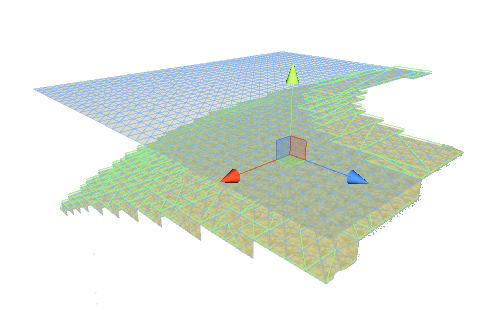
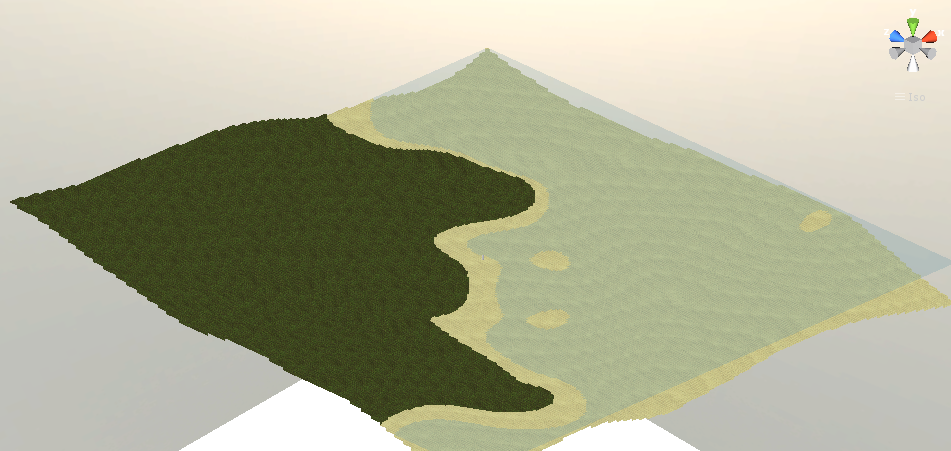
Finally, a screenshot! I added transparent voxels and support for multiple shaders when rendering a chunk, each material getting its own submesh. Here is the result. It also shows the improved terrain functions, now based on fractional Brownian motion, which sums several octaves of noise at increasing frequencies and decreasing amplitudes to add detail at every scale. I also enabled mipmapping on DX10+ graphics cards, which fixes the texture flickering visible in the proof of concept.
Mesh collider optimization
Last, I optimized the mesh collider, as you can see in this screenshot (I added a block in the second view to show how the collider changes when the terrain is edited):
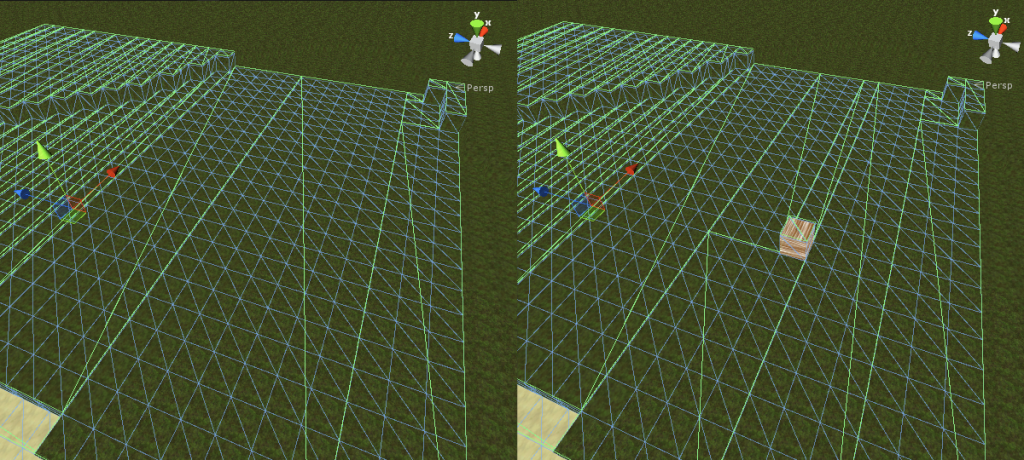
For now, this optimization isn’t applied to the rendering mesh (shown in blue). I’m waiting until lighting is done, because lighting is stored per vertex and the rendering mesh has to keep some intermediate vertices for the light gradients to look right. I’m not sure this optimization will even be necessary there.
I couldn’t find any explanation of how to do this, even though it’s mentioned everywhere, but it’s fairly straightforward. Instead of generating geometry block by block, you generate it face by face, using a boolean array to track which block faces are already covered:
- Iterate over the voxel array until you find a face that needs to be generated and isn’t covered yet.
- From that voxel, extend along a first direction until you reach a face that is already covered or doesn’t need to be generated.
- Then extend along the second direction, row by row, as long as each full row of that length can be covered.
- The starting point and the two lengths define a rectangle. Generate it as a single quad and mark every face it covers.
- Resume the main iteration until you reach the end of the array.
Repeat this for each of the six face directions. It’s short, but hopefully clear.
While writing this article, I realized it wouldn’t matter if some collider quads overlapped or sat inside the geometry. For example, when I added the block in the screenshot, I could have simply added a quad on top of it without touching the rest of the collider. I’ll look into it.
For now this only works for top faces. Here again, I’m looking for a way to avoid duplicating the code, especially since the algorithm will have to change a lot once new shapes are added.
The source code of this engine is archived on GitHub.